注意:本程序使用SpringBoot+Mybatis Plus
Mybatis Plus的分页插件自定义性不是很强,所以打算手动写Mapper来进行多表联合查询。
现有表 student学生表 id stuName stuAge graduateDate facultyId 1 卢1 21 2019-11-20 20:29:20 1 2 卢2 20 2019-11-27 20:29:40 2 3 卢3 22 2019-11-28 20:29:53 3 4 卢4 17 2019-11-28 20:30:20 2 5 卢5 17 2019-11-21 20:29:20 1 6 卢6 17 2025-12-11 20:29:20 3 7 卢7 20 2019-11-20 20:29:20 2 8 卢8 22 2019-11-27 20:29:40 3 9 卢9 17 2025-12-11 20:29:20 2 10 卢10 21 2019-11-28 20:30:20 1 11 卢11 17 2019-11-21 20:29:20 1 12 卢12 17 2019-11-11 20:29:20 3 13 卢13 17 2019-11-20 20:29:20 2 14 卢14 18 2025-12-11 20:29:20 3 15 卢15 22 2019-11-28 20:29:53 3 16 卢16 22 2019-11-28 20:30:20 1 17 卢17 18 2019-11-21 20:29:20 1 18 卢18 20 2025-12-11 20:29:20 2 19 卢19 21 2019-11-21 20:29:20 3 20 卢20 19 2025-12-11 20:29:20 3 21 卢21 18 2019-11-28 22:16:17 1
facultylist学院表 id facultyName 1 计算机与通信工程学院 2 数学与统计学院 3 文法学院
同时满足以下需求 多表联合查询出学院名字 需求展示:学生表联合学院表隐去学院id直接展示学院名给用户:
id stuName stuAge graduateDate facultyName 1 卢1 21 2019-11-20 20:29:20 计算机与通信工程学院 2 卢2 20 2019-11-27 20:29:40 数学与统计学院 3 卢3 22 2019-11-28 20:29:53 文法学院 4 卢4 17 2019-11-28 20:30:20 数学与统计学院 5 卢5 17 2019-11-21 20:29:20 计算机与通信工程学院 … … … … …
可以带多条件查询 学生名字模糊搜索 年龄范围搜索 搜索是否毕业 指定字段排序 指定页码,页数据大小进行物理分页查询 解决步骤 今天找了一下午资料,终于可以同时满足以上所有需求了!开干!
Spring Boot配置 重要配置已经做注释!
1
2
3
4
5
6
7
8
9
10
11
12
13
server.port =9999 spring.jackson.time-zone =GMT+8 spring.jackson.date-format =yyyy-MM-dd HH:mm:ss spring.datasource.url =jdbc:mysql://127.0.0.1:3306/test?characterEncoding=utf-8&serverTimezone=GMT%2b8&allowMultiQueries=true spring.datasource.username =root spring.datasource.password =6666 spring.datasource.driver-class-name =com.mysql.cj.jdbc.Driver mybatis-plus.configuration.map-underscore-to-camel-case =false mybatis-plus.mapper-locations =classpath:mapping/*Mapper.xml
MP配置 创建一个MP的配置类写入如下内容,主要是配置mapper路径
1
2
3
4
5
6
7
8
9
10
11
package com.looyeagee.web.util;import org.mybatis.spring.annotation.MapperScan;import org.springframework.context.annotation.Configuration;import org.springframework.transaction.annotation.EnableTransactionManagement;@EnableTransactionManagement @Configuration @MapperScan ("com.looyeagee.web.mapper" )public class MybatisPlusConfig }
实体类编写 Student.java 1 2 3 4 5 6 7 8 9 10 11 12 13 14 15 16 17 package com.looyeagee.web.bean;import com.fasterxml.jackson.annotation.JsonInclude;import lombok.Data;import java.io.Serializable;import java.util.Date;@Data @JsonInclude (JsonInclude.Include.NON_NULL)public class Student implements Serializable private Long id; private String stuName; private Integer stuAge; private Date graduateDate; private Long facultyId; }
Select.java(把查询条件封装成类) 1 2 3 4 5 6 7 8 9 10 11 12 13 14 15 16 17 18 package com.looyeagee.web.bean;import lombok.AllArgsConstructor;import lombok.Data;import java.io.Serializable;@Data public class Select implements Serializable String stuName; Integer minAge; Integer maxAge; Boolean isGraduate; Integer pageNumber; Integer pageSize; String orderBy; Boolean highToLow; }
Result.java(把结果也封装) 1 2 3 4 5 6 7 8 9 10 11 12 13 14 15 16 17 package com.looyeagee.web.bean;import com.fasterxml.jackson.annotation.JsonInclude;import lombok.Data;import java.io.Serializable;import java.util.Date;@Data @JsonInclude (JsonInclude.Include.NON_NULL)public class Result implements Serializable private Long id; private String stuName; private Integer stuAge; private Date graduateDate; private String facultyName; }
StudentMapper.xml编写 前提知识:
mysql如何通过当前页码和页数据条数分页? mysql limit m,n是mysql分页用的语句,不过此处的m不是当前页码而是从第几条数据开始,n是取几条数据。所以假设PageNumber为第几页,PageSize为一页数据条数,则写法为limit (PageNumber-1)*PageSize,PageSize
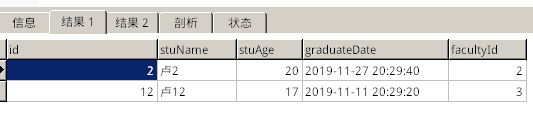
如何用mysql limit分页查询的同时返回符合条件数据总数以确定总页数? 用上面的方法虽然能分页,但是没有查出符合条件总个数,所以就不知道数据总共有多少页数。MP内部分页的实现是先查询符合条件的个数再用limit查询,不过这样会导致两次查询浪费资源,而且要写2个条件一模一样的select查询,很不方便,这里有个解决方案可以一次性返回数据和总条数:通过SQL_CALC_FOUND_ROWS和SELECT FOUND_ROWS()来获取。"2"的有4个同学,我想每页展示2条数据,并且访问第1页:根据我贴出的数据,满足条件的有4个,id分别为2,12,20,21。因为1页只展示2个数据,所以第1页应该是返回2,12这两个数据。语句
1 SELECT SQL_CALC_FOUND_ROWS * FROM `student` WHERE stuName LIKE '%2%' limit 0 ,2 ;SELECT FOUND_ROWS ();
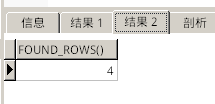
执行后一次性返回2个结果集(这就是前面要配置一次性可执行多个语句的原因,默认不可以一次性执行多个语句),如图:
第二个结果集就是总条数。下面介绍Mapper的配置。
2个结果集的配置:
1 2 <resultMap id ="ResultMap" type ="com.looyeagee.web.bean.Result" /> <resultMap id ="RecordsCount" type ="integer" />
resultMap标签是mapper的子标签用来指定结果集的id和类型。由于返回的第一个结果集的结果为我们定义的实体类Result,所以类型填写完整实体类路径;由于返回的第二个结果集的结果为一个整数,所以类型是integer。
1 2 <select id ="findResultByInfo" resultMap ="ResultMap,RecordsCount" parameterType ="com.looyeagee.web.bean.Select" resultType ="java.util.List" >
在select标签中添加resultMap属性来指定结果集的id,由于这个select会返回2个结果集,所以resultMap属性填写2个刚刚定义的结果集id,用英文逗号隔开。parameterType属性就是我们封装的查询实体类。返回的结果类型是List。
下面贴出完整多条件查询代码:PageNumber=(PageNumber-1)*PageSize的处理。
1 2 3 4 5 6 7 8 9 10 11 12 13 14 15 16 17 18 19 20 21 22 23 24 25 26 27 28 29 30 31 32 33 34 35 36 37 38 39 40 41 42 43 44 45 46 47 48 49 50 51 52 53 54 55 56 57 <?xml version="1.0" encoding="UTF-8"?> <!DOCTYPE mapper PUBLIC "-//mybatis.org//DTD Mapper 3.0//EN" "http://mybatis.org/dtd/mybatis-3-mapper.dtd" > <mapper namespace ="com.looyeagee.web.mapper.StudentMapper" > <resultMap id ="ResultMap" type ="com.looyeagee.web.bean.Result" /> <resultMap id ="RecordsCount" type ="integer" /> <select id ="findResultByInfo" resultMap ="ResultMap,RecordsCount" parameterType ="com.looyeagee.web.bean.Select" resultType ="java.util.List" > SELECT SQL_CALC_FOUND_ROWS `student`.`id` AS `id`, `student`.`stuName` AS `stuName`, `student`.`stuAge` AS `stuAge`, `student`.`graduateDate` AS `graduateDate`, `facultylist`.`facultyName` AS `facultyName` FROM ( `facultylist` JOIN `student` ) WHERE ( `facultylist`.`id` = `student`.`facultyId`) -- 标题模糊搜索 <if test ="stuName != null" > AND `student`.`stuName` LIKE CONCAT('%',#{stuName},'%') </if > -- > =是大于等于 <if test ="minAge!=null" > AND `student`.`stuAge`> = #{minAge} </if > -- < =是小于等于 <if test ="maxAge!=null" > AND `student`.`stuAge` < = #{maxAge} </if > -- 没毕业 毕业时间大于现在 <if test ="isGraduate != null and isGraduate ==false" > AND `student`.`graduateDate`> =NOW() </if > -- 毕业了 毕业时间小于现在 <if test ="isGraduate != null and isGraduate ==true" > AND `student`.`graduateDate`< =NOW() </if > <if test ="orderBy!=null and orderBy!=''" > <if test ="highToLow ==null or highToLow ==false" > ORDER BY ${orderBy} ASC,`student`.`id` ASC -- 加id ASC是为了保证分页结果的唯一性 mysql排序是不稳定的 https://www.jianshu.com/p/1e8a19738ae4 </if > <if test ="highToLow !=null and highToLow ==true" > ORDER BY ${orderBy} DESC,`student`.`id` ASC </if > </if > -- 分页查询 LIMIT #{pageNumber},#{pageSize}; -- 接着查询符合条件个数 SELECT FOUND_ROWS(); </select > </mapper >
StudentMapper类编写 注意返回类型即可。
1 2 3 4 5 6 7 8 9 10 11 12 13 package com.looyeagee.web.mapper;import com.baomidou.mybatisplus.core.mapper.BaseMapper;import com.looyeagee.web.bean.Select;import com.looyeagee.web.bean.Student;import java.util.List;public interface StudentMapper extends BaseMapper <Student > List<List<?>> findResultByInfo(Select select); }
测试类编写 关于总页数计算的说明:总数据条数除以每页数据条数,如果没有余数,结果就是总页数;如果有余数,则要将计算结果+1(进1法);用一句话就是(totalCount + pageSize - 1) / pageSize
1 2 3 4 5 6 7 8 9 10 11 12 13 14 15 16 17 18 19 20 21 22 23 24 25 26 27 28 29 30 31 32 33 34 35 36 37 38 39 40 41 42 package com.looyeagee.web;import com.looyeagee.web.bean.Result;import com.looyeagee.web.bean.Select;import com.looyeagee.web.mapper.StudentMapper;import com.looyeagee.web.service.impl.StudentServiceImpl;import org.junit.jupiter.api.Test;import org.springframework.beans.factory.annotation.Autowired;import org.springframework.boot.test.context.SpringBootTest;import java.util.List;@SpringBootTest class WebApplicationTests @Autowired StudentMapper studentMapper; @Test void selectTest () Select selectInfo = new Select(); int nowPageIndex = 1 ; int pageSize = 5 ; selectInfo.setPageNumber((nowPageIndex - 1 ) * pageSize); selectInfo.setPageSize(pageSize); selectInfo.setOrderBy("stuAge" ); selectInfo.setHighToLow(true ); selectInfo.setIsGraduate(true ); selectInfo.setMinAge(17 ); selectInfo.setMaxAge(20 ); List<List<?>> findtest = studentMapper.findResultByInfo(selectInfo); List<Result> orderinfos = (List<Result>) findtest.get(0 ); int totalCount = (Integer) findtest.get(1 ).get(0 ); System.out.println("当前页面记录数:" + orderinfos.size()); System.out.println("符合条件记录数:" + totalCount); System.out.println("当前页数:" +nowPageIndex); System.out.println("总页数:" + ((totalCount + pageSize - 1 ) / pageSize)); orderinfos.forEach(System.out::println); } }
以上的测试是筛选在我们的21个数据中,最小年龄17,最大年龄20,已经毕业(毕业时间小于现在时间),总共结果是有9个同学:通过年龄降序分别为2,7,17,21,4,5,11,12,13号,
1 2 3 4 5 6 7 8 9 当前页面记录数:5 符合条件记录数:9 当前页数:1 总页数:2 Result(id=2, stuName=卢2, stuAge=20, graduateDate=Wed Nov 27 20:29:40 CST 2019, facultyName=数学与统计学院) Result(id=7, stuName=卢7, stuAge=20, graduateDate=Wed Nov 20 20:29:20 CST 2019, facultyName=数学与统计学院) Result(id=17, stuName=卢17, stuAge=18, graduateDate=Thu Nov 21 20:29:20 CST 2019, facultyName=计算机与通信工程学院) Result(id=21, stuName=卢21, stuAge=18, graduateDate=Thu Nov 28 22:16:17 CST 2019, facultyName=计算机与通信工程学院) Result(id=4, stuName=卢4, stuAge=17, graduateDate=Thu Nov 28 20:30:20 CST 2019, facultyName=数学与统计学院)
将nowPageIndex改为2,输出第二页结果(剩余4个数据):
1 2 3 4 5 6 7 8 当前页面记录数:4 符合条件记录数:9 当前页数:2 总页数:2 Result(id=5, stuName=卢5, stuAge=17, graduateDate=Thu Nov 21 20:29:20 CST 2019, facultyName=计算机与通信工程学院) Result(id=11, stuName=卢11, stuAge=17, graduateDate=Thu Nov 21 20:29:20 CST 2019, facultyName=计算机与通信工程学院) Result(id=12, stuName=卢12, stuAge=17, graduateDate=Mon Nov 11 20:29:20 CST 2019, facultyName=文法学院) Result(id=13, stuName=卢13, stuAge=17, graduateDate=Wed Nov 20 20:29:20 CST 2019, facultyName=数学与统计学院)